
Stage 4 - Branching and Merging
In Stage 3 we made the codebase cleaner: only intended edits reached commit. Now the team wants a new feature: show task priorities with color labels in task-service. You do not do this directly on main. You create a branch.
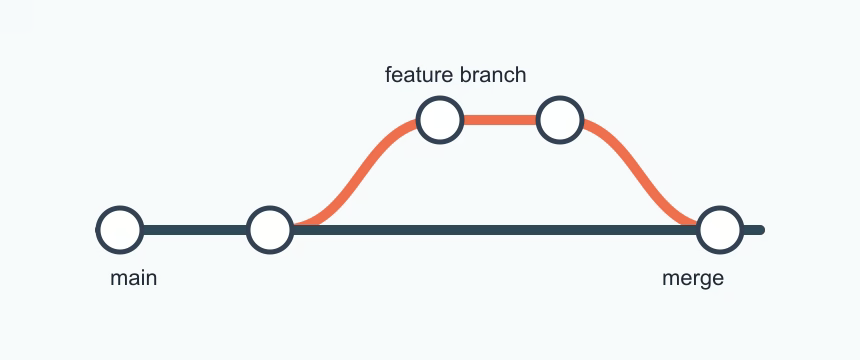
Branches are safe working threads
A branch is a separate place to work on one idea without breaking the stable version of the project. Keep main as the version that should stay usable. Create a branch when you want to try a feature, fix a bug, or prepare a change for review.
Think of it like this: main is the clean team version, and your branch is your workbench. You can make commits on the branch, check the result, and only then bring the change back to main.
Open your project state and create a feature branch:
git switch main
git switch -c feature/task-priority-labels
Now task-service.js can evolve without disturbing the baseline. Open the file in your editor, replace its content with this version, and save it:
const tasks = [];

export function addTask(task) {
  const exists = tasks.some((item) => item.title === task.title);
  if (exists) return false;
  tasks.push(task);
  return true;
}
Commit this feature separately:
git add task-service.js
git commit -m "feat: prevent duplicate task titles"
Returning and merging
Switch back to stable line and merge:
git switch main
git merge feature/task-priority-labels
If main has not changed on the same files, merge is often clean or fast-forward. If it changed, Git may create a merge commit. Either result is valid as long as the feature behavior is now in main.
| Command | Use when | Key idea |
|---|---|---|
git branch | show branch list | Names represent work streams |
git switch -c | create + switch in one command | Use short, descriptive names |
git merge | bring branch into current branch | “Current branch receives changes” |
Branching in team rhythm
Instead of one giant commit for everything, teams usually create multiple branches:
fix/duplicate-checkfeature/task-priority-labelsdocs/task-readme-refresh
Each branch carries one intent. That makes review faster and rollback safer.
Practice on task-service
- On
main, make one more commit such as small docs improvement. - Create
feature/task-analyticsand changenotes.txtor a new file. - Commit there.
- Switch to
mainand merge the feature. - Run
git log --oneline --graph.
You should now feel the branch as a reversible path for experiments, not as a duplicate copy of the project.
Extended reflection: from branch behavior to release safety
When a branch is rejected by team review, Git does not force you to delete effort. You can keep the branch, add one correction commit, and try merge again. This changes nothing in main until acceptance. That makes branching safer than editing main directly, especially when business rules evolve quickly.
As a long-lived habit, keep at least two local references:
- the current feature branch,
- a clean
mainbranch kept aligned with remote.
Before every merge, run a quick git log --oneline --graph check and confirm that your branch history is coherent and small. Teams that follow this process detect accidental overlap earlier, because they can compare your branch path against the shared main line without opening every file.
At this point your project workflow should have both a shared future and a recoverable past.
Practice checkpoint in task-service
Build one more experiment:
- create branch
feature/priority-filter - make a tiny change in code only
- keep docs unchanged
- open merge request only after a short status check
This demonstrates the same intent repeatedly: branch is your safe sandbox, merge is the controlled admission gate.