
Stage 2 - Git Fundamentals: Repositories and Commits
In Stage 1 we decided on one concrete project: task-service. The next step is turning that folder into a repository with full history.
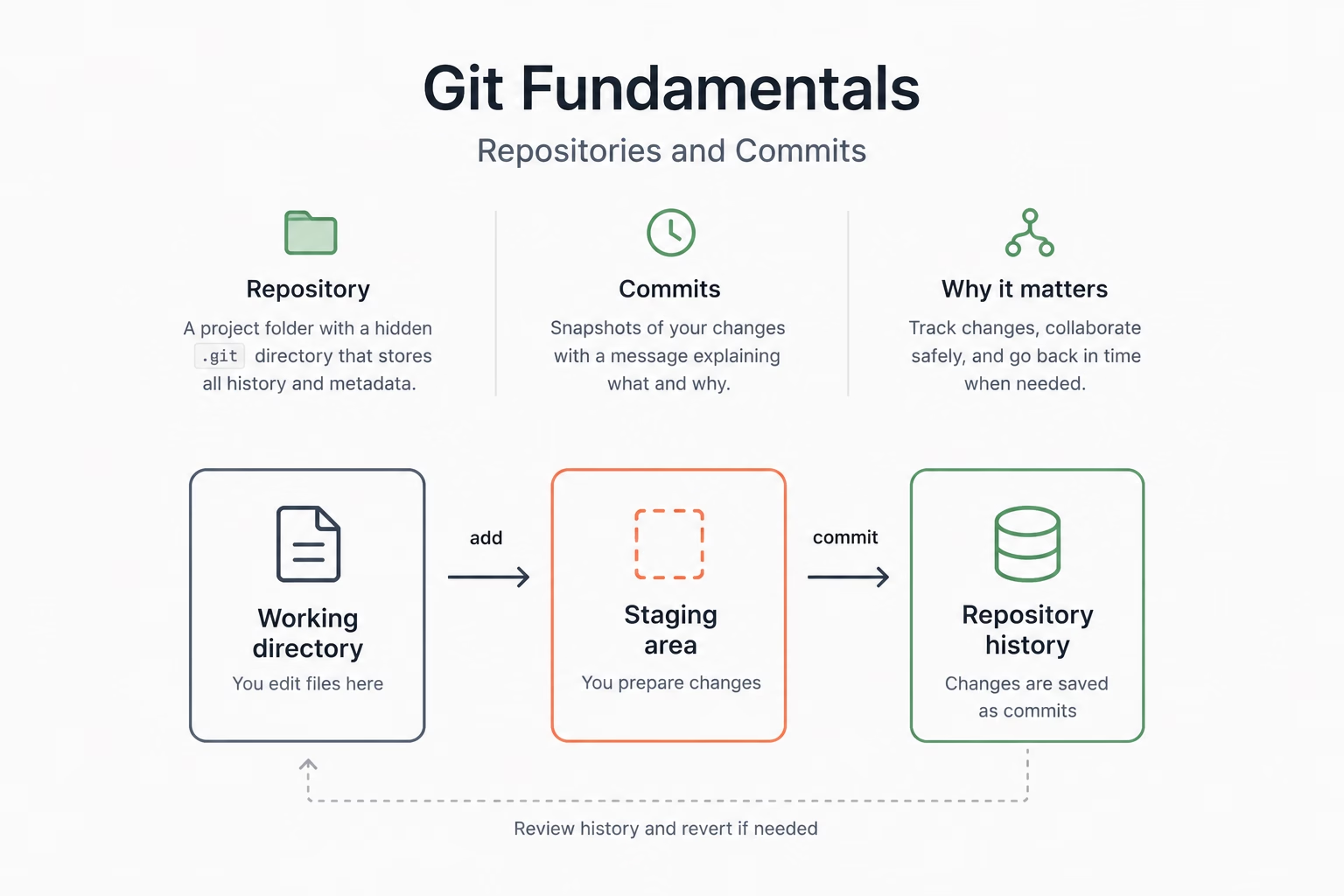
A Git repository is not a separate product; it is a normal project folder plus a hidden .git directory. That hidden folder contains the local history model: commit objects, branch references, configuration, and the index used for staging.
What happens when you call git init
Create a folder named task-service-tutorial in Finder, File Explorer, or your IDE. Then open a terminal in that folder and run:
git init
Git creates a local database next to your files. From this moment, commands like status, diff, commit operate over repository history, not just the current disk state.
Think of .git as an internal ledger. The files stay where they are. The ledger records how they change over time.
Three places your change passes through
This stage uses the same set of files to keep continuity:
- Working directory: what you edit now.
- Staging area: what you intentionally select for the next commit.
- Commit history: what becomes a fixed point in the project timeline.
Create two files in your editor or IDE.
README.md:
# Task Service

Educational task management starter for a small team.
task-service.js:
const tasks = [];

export function addTask(task) {
  tasks.push(task);
}
Save both files. Now ask Git what it sees:
git status
git status is your dashboard. It shows which files are untracked, modified, staged, or clean. In real work, teams often commit wrong changes when this is skipped.
Now create the first commit:
git add README.md task-service.js
git commit -m "chore: initialize task service scaffold"
Build a short but meaningful timeline
Inspect history in two levels:
git log
git log --oneline
git log --oneline is compact; git log is detailed. Either is valid, just like a map and a street view.
Continue with two more commits so the story can evolve. First, open README.md, add this line, and save the file:
- Sort by priority, then due date
Then commit the documentation change:
git add README.md
git commit -m "docs: define default task ordering rules"
Next, create notes.txt with this content:
- [ ] Add duplicate task guard
Then commit the new note:
git add notes.txt
git commit -m "docs: add QA checklist for task behavior"
After three commits, the repository has enough history for merging and review in later stages.
Why this loop matters
You will not avoid branches or PRs by skipping this part. You need a stable local loop:
- edit,
- stage,
- commit,
- inspect history,
- repeat.
Everything advanced later (remote sync, conflict resolution, recovery) assumes this loop is clear.
| Stage action | Git purpose |
|---|---|
| Initializing repo | Local history appears |
| First commit | Baseline you can compare future behavior against |
| Additional commits | Explicit points for review and rollback |
Checkpoint: you can initialize a repository, make at least three meaningful commits, and explain where each commit sits in the timeline.