
Stage 2 - Entities: Mapping Java Classes to Tables
An entity is a Java class whose object represents one database row. In JPA, an entity is not just any class. It is a class marked with @Entity, has an identifier marked with @Id, and follows rules that let the provider create, load, and track objects. The simplest mental model is direct: one entity class maps to one table, one entity object maps to one row, and fields map to columns.
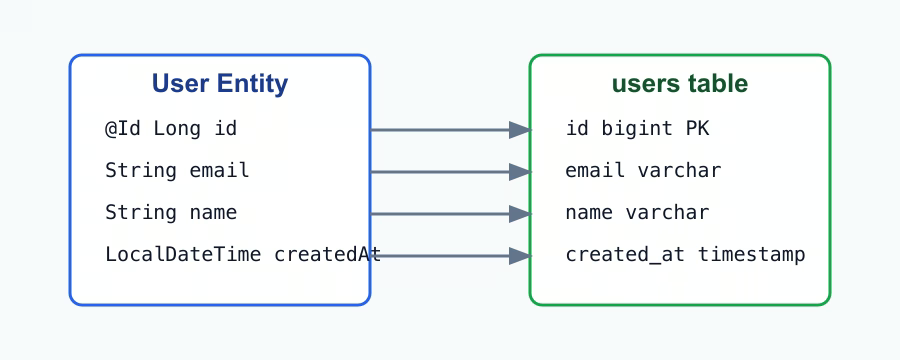
What makes a class an entity
JPA must be able to instantiate the class, so an entity needs a no-argument constructor. It can be protected, but it must exist. The class should have a stable primary key field. It should not be a Java record because JPA entities are mutable objects with lifecycle state. Fields are usually private, and application code uses methods or constructors to keep object state valid.
@Entity
@Table(name = "users")
public class User {
    @Id
    @GeneratedValue(strategy = GenerationType.IDENTITY)
    private Long id;

    @Column(nullable = false, unique = true, length = 160)
    private String email;

    @Column(nullable = false, length = 120)
    private String name;
}
@Entity tells JPA that this class participates in persistence. Without it, Hibernate treats the class as an ordinary Java type. @Table configures table-level mapping. If @Table is omitted, JPA derives a table name from the class name, but explicit names are often clearer in production projects. @Table can set name, schema, and unique constraints that involve multiple columns.
Primary key and generated values
A primary key uniquely identifies one row in a table. In JPA, the primary key field is marked with @Id. It is the identity of the entity from the database point of view. Two rows cannot have the same primary key, and repositories use it for methods such as findById and deleteById.
@GeneratedValue describes how the id is created. IDENTITY means the database creates the id during insert, often through an auto-increment or identity column. SEQUENCE uses a database sequence, common in PostgreSQL and Oracle. AUTO lets the provider choose a strategy for the database dialect. TABLE uses a separate table for ids and is rarely chosen for new applications because it is less efficient.
| Id strategy | What Hibernate must do before/while inserting | Why it matters in practice |
|---|---|---|
IDENTITY | Insert the row and receive the id from the database identity column. | Simple to understand, but Hibernate usually cannot batch inserts as efficiently. |
SEQUENCE | Ask a database sequence for the next id, then insert with that id. | Common with PostgreSQL and efficient when insert volume grows. |
AUTO | Choose a strategy from the database dialect and provider defaults. | Acceptable for demos, but production teams often prefer an explicit strategy. |
TABLE | Store and increment ids in a separate table. | Mostly legacy; it adds extra database work for id generation. |
Columns and Java types
@Column configures how a field maps to a database column. name sets the column name. nullable = false means the column should not accept NULL. unique = true creates or describes a uniqueness rule for one column. length controls the length of string columns. These settings are not a replacement for migrations, but they keep the Java model honest and help Hibernate validate or generate schema in learning projects.
Common Java types map naturally to SQL types. String becomes a text or varchar column. Integer, Long, and Double map to numeric types. Boolean maps to a boolean column where the database supports it. LocalDate stores a date without time. LocalDateTime stores date and time without timezone. For money, prefer BigDecimal over Double because floating-point values are not exact.
Time fields such as createdAt and updatedAt are audit fields. createdAt records when a row was created. updatedAt records the last modification time. In Spring Data JPA, auditing can be automated with @CreatedDate, @LastModifiedDate, and @EnableJpaAuditing, but it is important to understand the meaning before adding annotations.
Practice
Create two entities: User and Product. User should have id, email, name, createdAt, and updatedAt. Product should have id, name, price, available, and createdAt. Use explicit table names: users and products. Use nullable = false for required fields and a unique constraint for email. Start the application with schema generation only in a training environment, then inspect the generated tables in PostgreSQL.
Understanding checklist
- I can explain the relation between entity, table, object, row, field, and column.
- I know why every entity needs an
@Id. - I can choose between
IDENTITYandSEQUENCEfor common cases. - I understand what
nullable,unique, andlengthmean. - I can model basic audit fields without confusing them with business data.