
Stage 6 - JPQL: Querying Entities Instead of Tables
JPQL queries the entity model, while SQL queries the database schema. It looks similar to SQL, but it operates on entity classes and entity fields, not directly on table names and column names. SQL says select * from users; JPQL says SELECT u FROM User u. Hibernate translates JPQL into SQL for the target database.
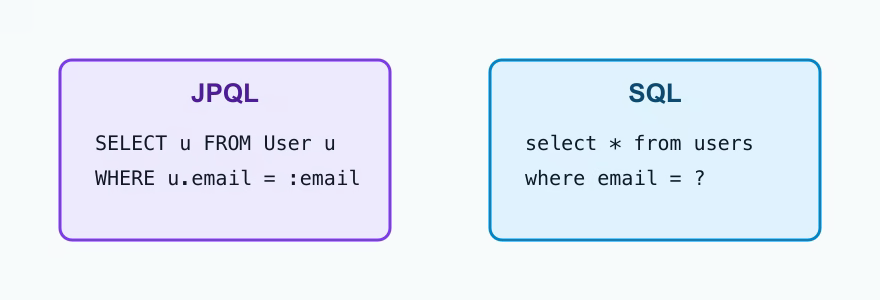
JPQL syntax
The basic query selects from an entity:
@Query("SELECT u FROM User u")
List<User> findAllUsers();
User is the entity class name, and u is an alias. Conditions use entity field names:
@Query("SELECT u FROM User u WHERE u.email = :email")
Optional<User> findByEmail(@Param("email") String email);
JPQL supports WHERE, ORDER BY, GROUP BY, aggregate functions, and joins through entity relationships. A join follows object references, not raw foreign key columns:
@Query("SELECT o FROM Order o JOIN o.user u WHERE u.email = :email")
List<Order> findOrdersByUserEmail(@Param("email") String email);
Parameters
Named parameters use :name and are usually clearer than positional parameters. Positional parameters use ?1, ?2, and so on. Named parameters survive refactoring better because their meaning is visible in the query.
| Query need | Better JPQL style | Why this explains the intent |
|---|---|---|
| Filter by one clear business value | WHERE u.email = :email | The parameter name documents that the value is an email, not just the first argument. |
| Filter by several values | WHERE p.price BETWEEN :min AND :max | Named parameters prevent confusion when two values have the same Java type. |
| Join through a relationship | JOIN o.user u | JPQL follows the entity relation instead of manually writing orders.user_id = users.id. |
| Return a list screen | SELECT new ...ProductSummary(...) | DTO projection loads only the fields that the response actually needs. |
DTO projection
Sometimes an API needs only a few fields. Loading full entities can be wasteful, especially when relationships are involved. JPQL can create DTO projections:
@Query("""
    SELECT new com.example.UserSummary(u.id, u.email, u.name)
    FROM User u
    WHERE u.active = true
    ORDER BY u.name
""")
List<UserSummary> findActiveUserSummaries();
DTO projection is useful for read-only screens, list endpoints, and reporting. It reduces loaded data and avoids accidental lazy loading. The tradeoff is that the DTO constructor and query must match.
JPQL vs derived queries
Spring Data can create queries from method names, such as findByEmail or findByNameContainingIgnoreCase. This is excellent for simple conditions. JPQL is better when the query needs joins, grouping, custom sorting logic, projections, or a condition that would make the method name unreadable.
Practice
Add queries for searching users by email, filtering products by price range and availability, and sorting products by name. Then add a DTO projection that returns only product id, name, and price. Compare generated SQL with SQL logging. The goal is not to memorize JPQL syntax, but to understand that JPQL describes operations on the entity model.
Understanding checklist
- I can explain how JPQL differs from SQL.
- I know that JPQL uses entity names and field names.
- I can use
@Querywith named parameters. - I understand when DTO projection is useful.
- I can choose between derived query methods and JPQL.