
Stage 7. Normalization: Keep Data Clean Over Time
Normalization is the process of organizing tables so the same business information is not copied everywhere. The goal is not to make the schema look academic. The goal is practical: when a customer changes a phone number, a product name is corrected, or an order receives another item, the database should have one clear place where that information is maintained.
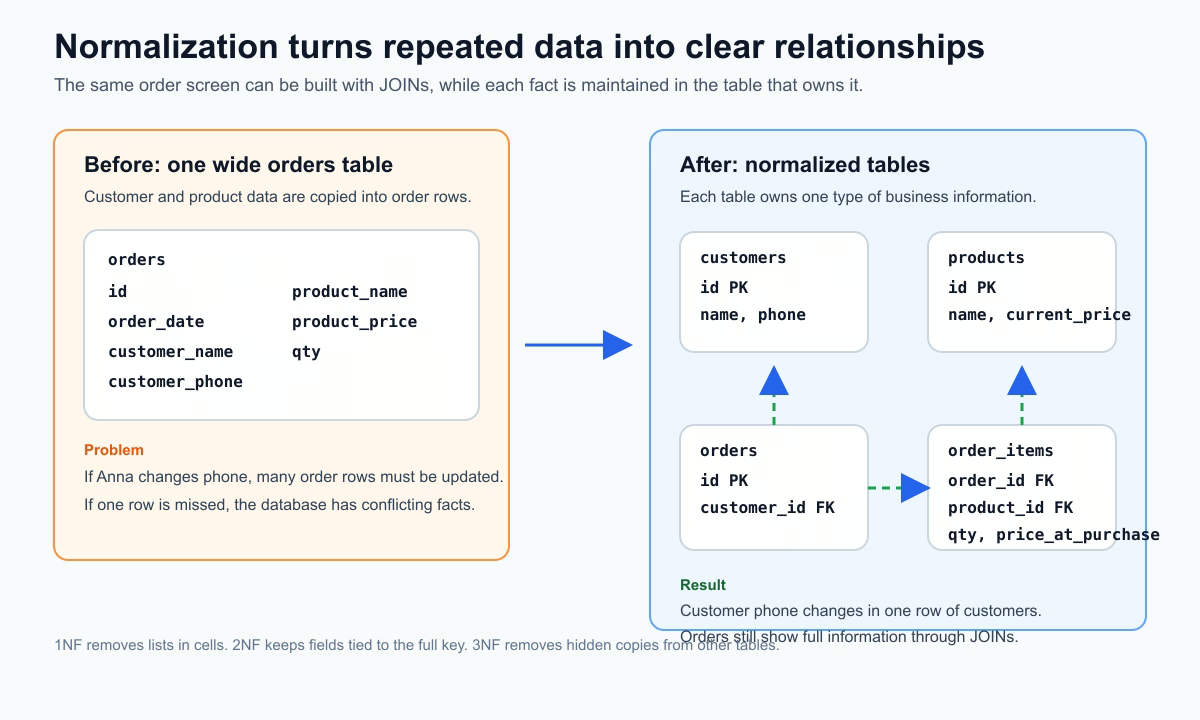
Imagine an online shop that stores orders. A tempting first version is one large table with order data, customer data, and product data mixed together. It feels easy because one row contains everything you need to display an order. The problem appears later, when the same customer makes many orders or the same product appears in many orders. Names, phones, and product details start repeating. Once repeated data changes, the database can contain several versions of the same fact.
| Form | Practical idea | What to check |
|---|---|---|
| 1NF | One value per cell | No comma-separated lists |
| 2NF | Non-key fields describe the whole key | No field depends on only part of a composite key |
| 3NF | Fields describe the row, not another field | No hidden copy of data from another table |
Bad design example
orders(id, order_date, customer_name, customer_phone, product_name, product_price)
This table mixes several different things. It stores the order itself, the customer profile, and the product catalog in one row. That creates real maintenance problems:
customer_phoneis copied into every order row for that customer;product_priceis ambiguous because current catalog price and historical order price are different facts;- one order with several products is hard to represent without repeating order fields;
- updates become risky because one missed row creates conflicting data.
Normalized design
customers(id, name, phone)
products(id, name, current_price)
orders(id, customer_id, order_date)
order_items(order_id, product_id, qty, price_at_purchase)
Now the model has clear ownership. Customer contact data is maintained in customers. Product catalog data is maintained in products. The order header is maintained in orders. The list of purchased products is maintained in order_items. The price paid at the moment of purchase is stored in order_items.price_at_purchase, because it belongs to the order history, not to the current catalog price.
Normal forms in plain language
First normal form means each cell contains one value, not a list. For example, product_names = 'Keyboard, Mouse, Cable' inside one order row is a bad sign. Separate products should become separate rows in order_items.
Second normal form matters when a table has a composite key, such as (order_id, product_id). Every non-key field should depend on the whole key. In order_items, qty depends on both the order and the product: it describes how many units of that product were bought in that order. But customer_phone does not depend on (order_id, product_id), so it does not belong there.
Third normal form means a field should not depend on another non-key field. If orders stored both customer_id and customer_phone, the phone would depend on the customer, not directly on the order. That creates hidden duplication. The order should point to the customer, and the phone should stay in customers.
Query after normalization
SELECT o.id,
       c.name,
       SUM(oi.qty * oi.price_at_purchase) AS total_amount
FROM orders o
JOIN customers c ON c.id = o.customer_id
JOIN order_items oi ON oi.order_id = o.id
GROUP BY o.id, c.name
ORDER BY o.id;
| order_id | customer_name | total_amount |
|---|---|---|
| 101 | Anna | 2300.00 |
| 102 | Ivan | 900.00 |
This query is a normal result of normalized design. The data is split across several tables, and JOIN brings it together when the application needs a report or screen. Normalization does not mean you cannot display complete information. It means you do not permanently duplicate every detail just because one screen needs to show it.
Common mistakes:
- Putting everything in one wide table because it looks simpler today.
- Copying reference data, such as customer phone or product name, into many business tables.
- Storing comma-separated lists instead of separate rows.
- Missing foreign keys, so relationships exist only in application code.
- Normalizing historical facts incorrectly, for example using only
products.current_pricefor old orders.
Practical balance: OLTP systems, where users create orders, payments, tickets, and profiles, should usually start normalized. Analytics layers can denormalize later for read speed when needed. Denormalization is not bad by itself, but it should be a deliberate optimization, not the starting point for core transactional data.
Pre-release checklist:
- where each business fact is stored;
- whether one fact can be updated in one place;
- whether repeated data is a historical snapshot or accidental duplication;
- whether all links are enforced with foreign keys;
- whether each table has a clear reason to exist.
Normalization lowers future change cost and prevents data-quality bugs.
Practice Before the Next Lesson
Re-run the examples from this article on a tiny dataset of 5-10 rows. This step matters because SQL becomes much easier once you execute queries yourself and inspect real tabular output. Start with a plain version of the query, then change one thing at a time and compare behavior or execution plan. If results look wrong, validate each part: filters, selected columns, join conditions, and expected NULL handling.
Quick self-check:
- I can explain the lesson in one simple sentence.
- I can write a basic SQL example from memory.
- I can read query output and explain each column.
- I can name one common mistake and how to avoid it.
When requirements change, review schema ownership first, then add columns. This habit prevents accidental duplication and keeps long-term model quality high.
Extra Scenario: Customer Phone Change
A simple normalization test is this: what happens when a customer changes their phone number? In a good schema, you update one row in customers. In a poor schema, the phone number is copied into orders, invoices, deliveries, and support tickets, so part of the system inevitably keeps the old value.
UPDATE customers
SET phone = '+380501112233'
WHERE id = 42;
After that, all order-related joins should show the new phone automatically, with no mass updates. That is the practical sign of a stable data model: common changes touch the right table, not the whole database.