
Stage 3. SELECT, Filtering, Sorting, and Result Shape
In this topic, syntax alone is not enough. You need execution logic. A read query works like a pipeline: choose columns, choose source table, filter rows, sort result, limit output size.
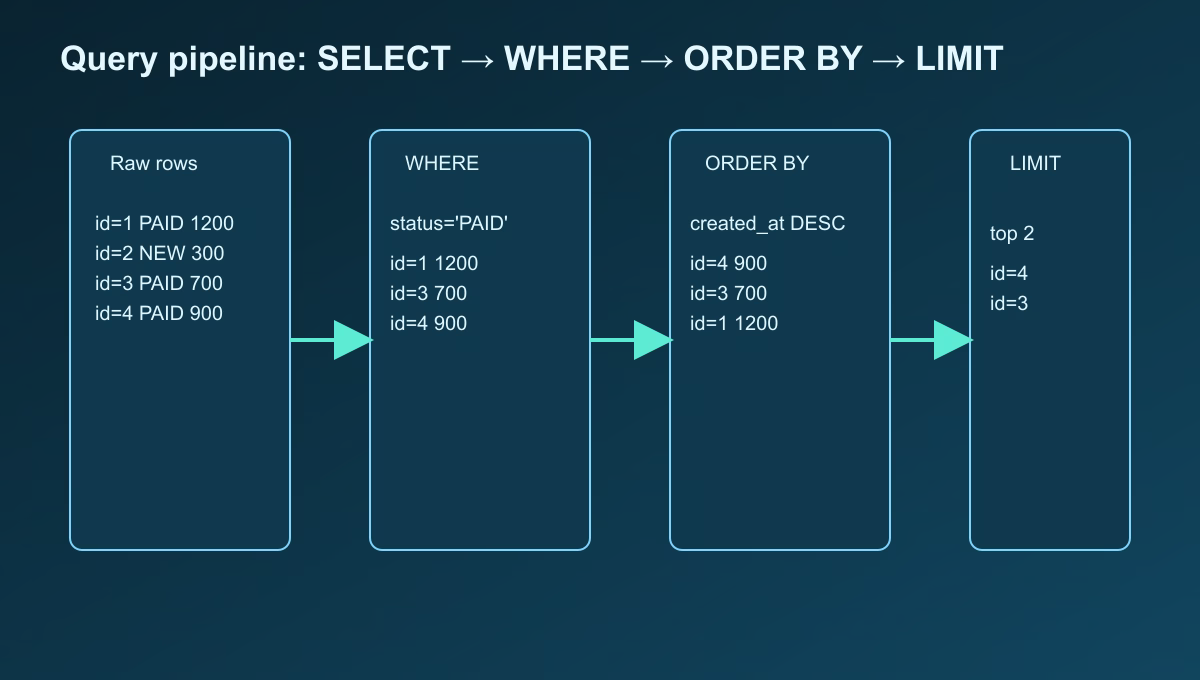
Base skeleton:
SELECT ...
FROM ...
WHERE ...
ORDER BY ...
LIMIT ...;
Below, each block is explained in detail.
Block 1. SELECT: output shape and why it matters
SELECT defines the final response structure.
SELECT id, user_id, amount, status, created_at
FROM orders;
Why explicit columns matter:
- Less unnecessary data transfer.
- Clear API/report contract.
- Lower risk of accidental sensitive-field exposure.
Common beginner mistake: using SELECT * everywhere. Acceptable for quick debugging, not ideal for production endpoints.
Aliases in SELECT
SELECT
  id AS order_id,
  amount AS order_amount
FROM orders;
Aliases improve output readability for frontend and DTO mapping.
Block 2. WHERE: what conditions are and how filtering works
WHERE filters rows and answers: “Which records should remain?”
SELECT id, amount, status
FROM orders
WHERE status = 'PAID';
Only paid orders remain.
Combining conditions
SELECT id, user_id, amount, status, created_at
FROM orders
WHERE status = 'PAID'
  AND amount >= 500
  AND created_at >= DATE '2026-05-01';
All conditions must be true.
Alternative with OR and IN:
WHERE status = 'PAID' OR status = 'SHIPPED'
WHERE status IN ('PAID', 'SHIPPED')
WHERE and NULL
-- wrong
WHERE paid_at = NULL

-- correct
WHERE paid_at IS NULL
WHERE runs before sorting and before LIMIT, so filtering strongly affects performance and result size.
Block 3. ORDER BY: why sorting is critical
ORDER BY defines row order. Without it, order is not guaranteed.
SELECT id, amount, created_at
FROM orders
WHERE status = 'PAID'
ORDER BY created_at DESC;
DESC = newest first, ASC = oldest first.
Why one sort key is often not enough
If several rows have the same created_at, order can be unstable. Add a tie-breaker:
ORDER BY created_at DESC, id DESC
This is essential for stable pagination.
LIMIT: output size control
LIMIT caps number of returned rows.
SELECT id, user_id, amount, status, created_at
FROM orders
WHERE status = 'PAID'
ORDER BY created_at DESC, id DESC
LIMIT 5;
Why LIMIT is useful:
- protects API from oversized responses;
- reduces network and client load;
- keeps list behavior predictable.
Full query walkthrough
SELECT id, user_id, amount, status, created_at
FROM orders
WHERE status = 'PAID'
ORDER BY created_at DESC, id DESC
LIMIT 5;
Logical execution:
- Read from
orders. - Keep only
PAIDrows. - Sort newest to oldest.
- Break ties by
id. - Return first 5 rows.
Example output
| id | user_id | amount | status | created_at |
|---|---|---|---|---|
| 15 | 2 | 900.00 | PAID | 2026-05-10 12:15 |
| 14 | 1 | 1200.00 | PAID | 2026-05-10 11:01 |
| 12 | 2 | 700.00 | PAID | 2026-05-10 10:40 |
| 9 | 1 | 450.00 | PAID | 2026-05-10 10:05 |
| 7 | 3 | 300.00 | PAID | 2026-05-10 09:58 |
Common beginner mistakes
SELECT *instead of explicit columns.- No
ORDER BYfor user-facing lists. - Wrong
NULLcheck (= NULLinstead ofIS NULL). - Too broad
WHEREconditions. - Missing
LIMITon large datasets.
Practice Before the Next Lesson
Step 1. Insert test rows:
INSERT INTO orders(user_id, amount, status, created_at) VALUES
(1, 1200.00, 'PAID', '2026-05-10 12:00:00'),
(1, 300.00,  'NEW',  '2026-05-10 11:00:00'),
(2, 700.00,  'PAID', '2026-05-10 10:00:00'),
(2, 950.00,  'PAID', '2026-05-10 09:00:00'),
(3, 150.00,  'CANCELLED', '2026-05-10 08:00:00');
Step 2. Run base query without filter:
SELECT id, user_id, amount, status, created_at
FROM orders;
Step 3. Add filter:
SELECT id, user_id, amount, status, created_at
FROM orders
WHERE status = 'PAID';
Step 4. Add sorting and limit:
SELECT id, user_id, amount, status, created_at
FROM orders
WHERE status = 'PAID'
ORDER BY created_at DESC, id DESC
LIMIT 5;
Final checks:
- only
PAIDrows; - newest date on top;
- at most 5 rows.