
Stage 3 — Spring Boot: Auto-Configuration Without Magic
Spring Boot does not exist so developers can stop understanding application setup. It exists so common setup can be created automatically by understandable rules. If the project has web dependencies, Boot prepares a web application. If it has JPA and a database driver, Boot tries to prepare a DataSource, JPA infrastructure, and repositories. If the Security starter is present, Boot adds basic security setup.
A beginner should remember this immediately: Boot does not guess what the developer wants. It looks at dependencies, classes, properties, and already created Beans, then makes a decision. Auto-configuration is not magic; it is a set of if conditions around the regular Spring container.

What happens during Boot startup
Startup usually begins with a class annotated with @SpringBootApplication. This annotation combines three roles. First, it marks the class as a source of configuration. Second, it enables component scanning so Spring can find your @Controller, @Service, @Repository, @Component, and other components. Third, it enables auto-configuration.
After that, Boot collects a list of possible auto-configurations and checks which ones match the current application. If the conditions match, configuration is applied and Beans are registered. If conditions do not match, it is skipped. For example, web configuration is not needed in a command-line application, and JPA configuration is not needed in a project without JPA dependencies.
That is why adding one dependency in build.gradle or pom.xml can change application behavior. You added a library, a new class appeared in the classpath, and a condition such as @ConditionalOnClass became true. Boot saw a new signal and enabled additional configuration.
Why Boot creates DataSource, Security, and Web
Boot makes decisions from several signals. The classpath shows which libraries are connected to the project. Bean presence shows whether the developer already created a custom Bean. Properties show configuration values such as the database URL or whether a feature is enabled. Application type shows what kind of application is running: servlet web, reactive web, or non-web.
If spring-boot-starter-web is present, Boot sees a web stack and prepares MVC infrastructure, JSON converters, and an embedded server. If spring-boot-starter-data-jpa and a JDBC driver are present, Boot tries to configure database access and JPA. If spring-boot-starter-security is present, Boot enables basic protection. This behavior is deterministic: it can be explained through dependencies and properties.
Starter dependency role
A starter is a convenient dependency that brings in a set of libraries for a common task. For example, spring-boot-starter-web brings Spring MVC, JSON handling, validation, and an embedded server. spring-boot-starter-data-jpa brings Spring Data JPA, Hibernate, and related libraries.
Starters solve two problems: they provide ready-made library sets and select compatible versions. Developers do not need to manually assemble ten dependencies and check whether their versions work together. But a starter is not an empty label. It changes the classpath, so it can enable new auto-configurations. After adding a starter, it is useful to understand which capabilities it brought into the application.
| Signal | Example | What Boot may do |
|---|---|---|
| Class exists in classpath | spring-boot-starter-web is present | Create web infrastructure and embedded Tomcat |
| Bean already exists | Developer declared a custom DataSource | Avoid creating the default DataSource |
| Property is set | spring.datasource.url | Use the value for database connection |
| Profile is active | dev or prod | Load the profile-specific configuration file |
AutoConfiguration.imports and conditional annotations
In modern Spring Boot versions, the list of auto-configurations lives in AutoConfiguration.imports files inside connected libraries. A beginner does not need to start by editing this file manually. The important part is its role: it is a list of configuration classes Boot may consider during startup.
But being present in that list does not mean the configuration will definitely turn on. Each such class usually contains conditions. @ConditionalOnClass means: enable this configuration only if a required class exists in the classpath. @ConditionalOnBean means: enable it only if a required Bean already exists. @ConditionalOnMissingBean means: create the default Bean only if the developer did not create one. @ConditionalOnProperty means: enable behavior only for a specific configuration value.
The simple mental model is this: AutoConfiguration.imports answers “which setup options can Boot try at all”, and conditional annotations answer “which of them fit this application right now”. If a Bean was not created, first check the conditions instead of business code: whether the dependency exists, whether the required property is set, whether the correct profile is active, and whether a conflicting Bean already exists.
External configuration and profiles
application.yml or application.yaml is the main configuration file of a Spring Boot application. It usually lives in src/main/resources. It contains values that should change without rewriting Java code: server port, database connection settings, logging level, external service parameters, feature flags, Actuator settings, and Security settings.
This example shows the idea, not a complete production file:
server:
  port: 8080

spring:
  datasource:
    url: jdbc:postgresql://localhost:5432/app
    username: app

logging:
  level:
    org.springframework.web: INFO
This file keeps the code the same while behavior can change through configuration. Locally the application may use a local database, in tests it may use a test database, and in production it may use the production database. Profiles are used for that.
A profile is a named environment or launch mode: dev, test, prod, local. For a profile, create a separate file next to the main one: application-dev.yml, application-test.yml, application-prod.yml. Boot first reads the shared application.yml, then applies the active profile file and overrides matching values.
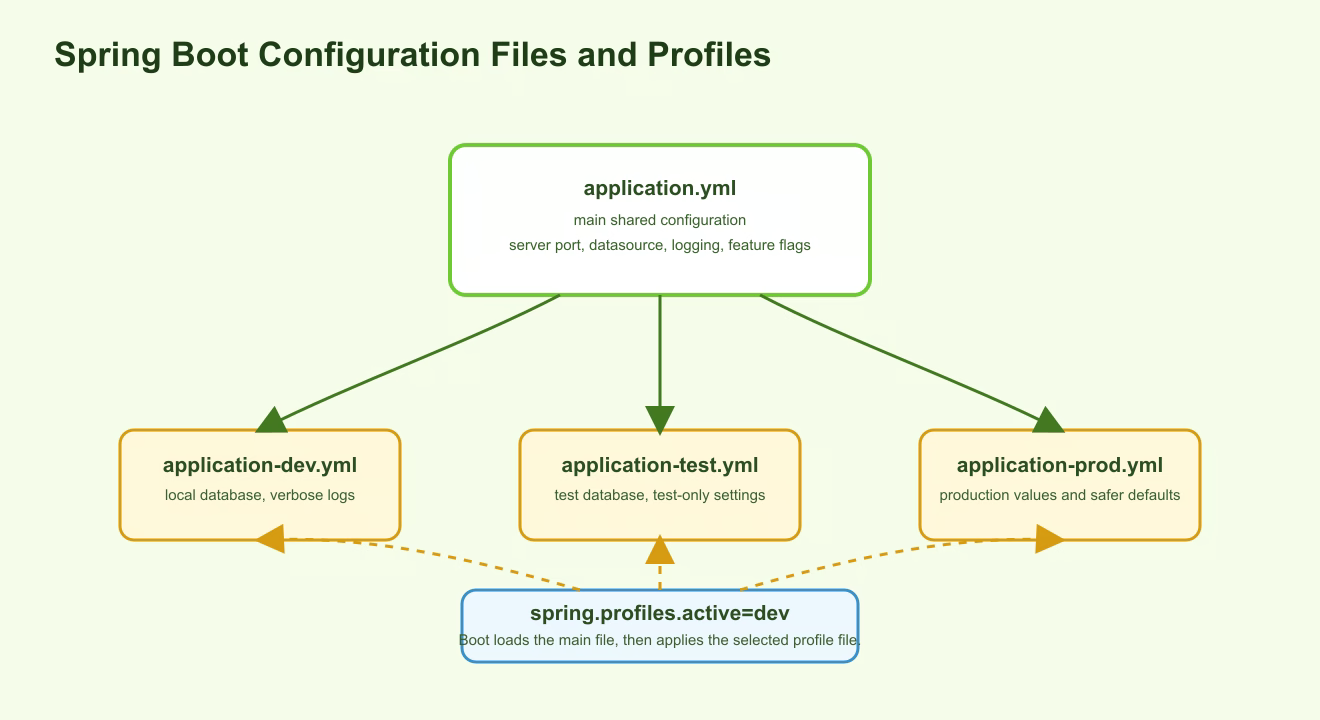
For example, application.yml can keep shared application settings, while application-dev.yml can define a local database and more detailed logging. You can activate a profile with the spring.profiles.active=dev property, the SPRING_PROFILES_ACTIVE=dev environment variable, a command-line argument, or IDE run configuration.
Embedded server and Actuator
In the older Java web deployment style, an application was often packaged as a WAR file and deployed to an external application server. An administrator first installed Tomcat or another server, then placed the application into it. Spring Boot usually takes a different approach: the server is embedded inside the application. When you add spring-boot-starter-web, Boot includes embedded Tomcat by default.
Embedded Tomcat is a real web server that starts together with your application. A Spring Boot application can be packaged as a jar and launched with a command such as java -jar app.jar. During startup, the JVM starts, the Spring context is created, Tomcat starts, a port is opened, and the application begins receiving HTTP requests. This is useful for local development, Docker, cloud deployments, and CI/CD because the artifact contains everything needed to run the web application.
Actuator is a set of operational endpoints for observing the application. It helps you understand whether the application is alive, which metrics are collected, which health checks pass, and which Beans and properties exist in the context. For example, a health endpoint is often used by a load balancer or Kubernetes to decide whether traffic can be sent to a specific application instance. Actuator does not replace logs and monitoring, but it provides standard operational information.
Practical example
You add spring-boot-starter-data-jpa and a PostgreSQL driver. After restart, Boot sees JPA and the driver in the classpath. Then it looks for spring.datasource.* settings. If the URL, username, and other required values are correct, Boot creates a DataSource, EntityManagerFactory, transaction manager, and repository infrastructure.
If the application does not start, do not immediately rewrite services. First check the simple causes: whether the driver is connected, whether the URL is correct, whether the needed profile is active, whether production settings were accidentally placed in a dev file, and whether a custom Bean changed the default behavior.
Practical rules for beginners
When Boot behavior is unclear, start with the inputs to auto-configuration. Check dependencies, the active profile, values in application.yml, and profile-specific files. This is usually faster than searching for an error in a controller or service.
If configuration differs between environments, do not mix everything in one file. Keep shared values in application.yml, and put differences into application-dev.yml, application-test.yml, or application-prod.yml. This makes it easier to see why local startup differs from production.
If Boot created a default Bean and you need different behavior, first try changing a property. If a property is not enough, declare your own Bean narrowly. Disable an entire auto-configuration module only when you understand what infrastructure it created and why that infrastructure is harmful in your case.
Stage takeaway
Spring Boot is a layer that automatically configures a Spring application from dependencies, properties, profiles, and already created Beans. It creates common infrastructure, but it does so through checkable conditions. Once classpath, starters, application.yml, profiles, embedded server, and Actuator are clear, Boot stops looking like magic and becomes a predictable tool.
Understanding checklist
- I can explain why adding a starter changes application behavior.
- I understand that
AutoConfiguration.importsprovides possible auto-configurations, while conditional annotations select matching ones. - I can explain what goes into
application.ymland why profile files exist. - I understand that embedded Tomcat starts inside the jar application.
- I can name why Actuator is useful in a running application.
Self-check questions
- Why can Boot create a Bean after a new dependency is added?
- How is
application.ymldifferent fromapplication-dev.yml? - Why does embedded Tomcat make running a Spring Boot web application simpler?