
Stage 4 — Spring MVC: Full HTTP Request Path
MVC means Model-View-Controller. It is an architectural idea for separating responsibilities in a web application. The Controller receives a request and decides what should happen next. The Model contains data needed for the response. The View defines how that data will be shown to the user. In a classic web application, the View is an HTML page rendered by the server and sent to the browser.
In a REST API, there is usually no View in the form of an HTML template. Instead of a page, the server returns data, most often JSON. That is why Spring MVC must be understood in two modes: controllers for pages and controllers for APIs. In both modes the request passes through the Spring MVC pipeline, but the final response is produced differently.

In server-rendered MVC, the controller puts data into Model, for example a page title and a list of orders. Then the controller returns a view name such as orders. Spring finds the orders.html template, the view reads values from Model, inserts them into HTML, and sends the finished page to the browser. In REST APIs, this step is usually replaced by object serialization to JSON.
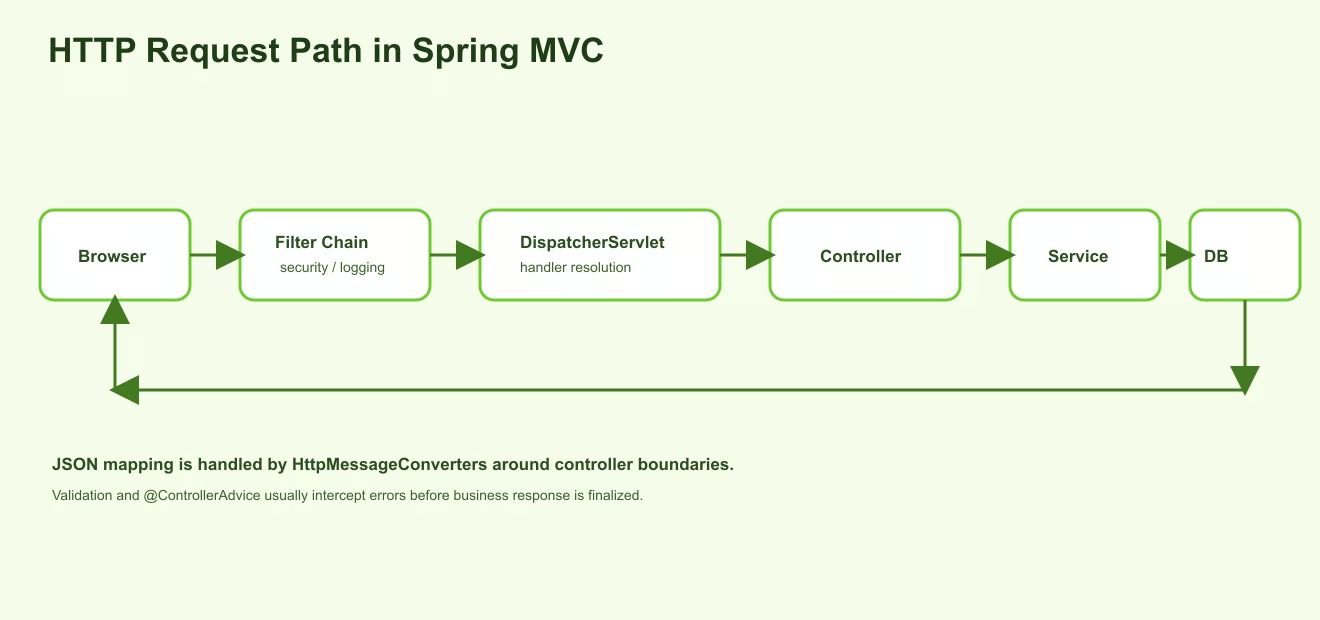
What DispatcherServlet does
DispatcherServlet is the central Spring MVC entry point in a servlet application. After an HTTP request has passed through the servlet container and filters, it reaches DispatcherServlet. Then Spring finds the matching handler, usually a controller method, runs MVC infrastructure around it, and organizes response creation.
For a beginner, the simplest model is this: DispatcherServlet is the dispatcher at the entrance to Spring MVC. It does not contain business logic, save orders, or register users. Its job is to route the request correctly: find the controller method, pass data into it, process the result, and return the response.
If an endpoint is not called, you need to understand where the request stopped. It may have been blocked by a filter, failed CORS preflight, failed route matching, failed JSON parsing, failed validation, or thrown an exception in a service. That is why the web layer cannot be debugged only by looking at the controller method.
@Controller and @RestController
@Controller is used when the application returns a view. A view is not a Java data object. It is the result shown to the user: for example an orders.html page rendered through Thymeleaf. A method can place data into Model, then return the view name. Spring finds the template, inserts the data, and sends finished HTML to the browser.
@Controller
class PageController {
    @GetMapping("/orders/page")
    String ordersPage(Model model) {
        model.addAttribute("title", "Orders");
        return "orders";
    }
}
In this example, the string "orders" is not the response text. It is the view name. Spring will look for a template such as orders.html, prepare HTML, and send it to the browser.
@RestController is used for REST APIs. It combines @Controller and @ResponseBody, so the returned object is not treated as a view name. The object is written directly into the HTTP response body. If the client expects JSON, Spring converts the Java object into JSON.
@RestController
class OrderApiController {
    @GetMapping("/api/orders/{id}")
    OrderResponse getOrder(@PathVariable Long id) {
        return new OrderResponse(id, "PAID");
    }
}
Here OrderResponse is not rendered as an HTML page. It becomes a JSON response such as {"id":1,"status":"PAID"}. Therefore APIs usually use @RestController, while server-rendered pages use @Controller.
How JSON becomes a Java object and back
In a REST API, the client often sends JSON in the request body. For example, the frontend sends POST /api/orders with body {"productId":10,"quantity":2}. A Java controller method should not manually work with a JSON string, so Spring performs conversion at the controller boundary.
If a method parameter is annotated with @RequestBody, Spring takes the request body and tries to convert it into a Java DTO. A DTO is a simple object for transferring data between the API and application code. This conversion is performed by HttpMessageConverters, and in a typical Spring Boot REST application JSON is usually handled by Jackson.
record CreateOrderRequest(Long productId, int quantity) {}

@PostMapping("/api/orders")
OrderResponse create(@RequestBody CreateOrderRequest request) {
    return orderService.create(request);
}
On input, deserialization happens: JSON becomes CreateOrderRequest. On output, serialization happens: OrderResponse becomes JSON. If the JSON syntax is broken, a field has the wrong type, or the DTO cannot be created, the failure can happen before the controller method body is entered. So “the controller is not called” often means a request conversion problem, not a service problem.
Validation and exception handling
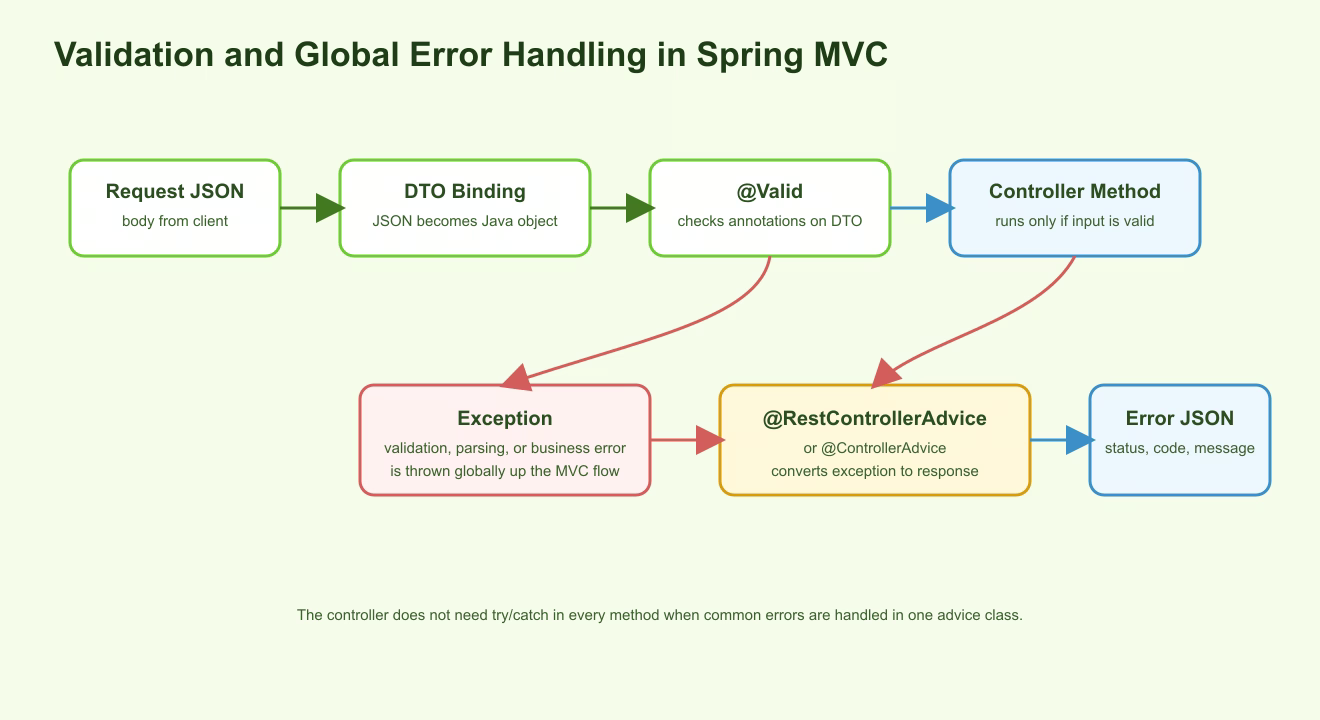
JSON can be syntactically correct but semantically invalid. For example, quantity is 0, email is empty, a date is in the past, or a required field is missing. Bean Validation is used for these checks: validation annotations on the DTO and @Valid on the controller parameter.
record CreateOrderRequest(
    @NotNull Long productId,
    @Min(1) int quantity
) {}

@PostMapping("/api/orders")
OrderResponse create(@Valid @RequestBody CreateOrderRequest request) {
    return orderService.create(request);
}
If the DTO fails validation, Spring throws an exception at the controller boundary. If a service cannot find an order, it may also throw an exception such as OrderNotFoundException. A normal API should not use try/catch in every controller method. Instead, it should use one global error handler.
@RestControllerAdvice or @ControllerAdvice marks a class that catches exceptions from controllers globally. Inside it, methods annotated with @ExceptionHandler receive exceptions and return understandable HTTP responses: status, error code, message, and sometimes a list of field errors. The practical difference is that @RestControllerAdvice directly returns a body, usually JSON; @ControllerAdvice is often used for MVC pages or more manual response handling.
@RestControllerAdvice
class ApiExceptionHandler {
    @ExceptionHandler(OrderNotFoundException.class)
    ResponseEntity<ApiError> handleNotFound(OrderNotFoundException ex) {
        return ResponseEntity.status(404)
            .body(new ApiError("ORDER_NOT_FOUND", ex.getMessage()));
    }
}
This gives the application one error contract. Frontend and integration clients do not need to parse random stack traces, HTML error pages, or different response formats. They always receive a predictable structure.
Filters and Interceptors
A Filter is a servlet-level object that processes the request before it reaches DispatcherServlet. Spring Boot applications have a filter chain: the request passes through filters in order. A filter can read headers, add a correlation id, log the request, check a token, limit body size, configure CORS, or stop the request before the controller.
You can create custom filters as well. For example, you can write a filter that generates a request id for every request and puts it into MDC for logs. You can write a filter that rejects requests without a required header. The important thing is the power of a filter: it is very early in the pipeline, so it can affect all endpoints, including requests that have not reached Spring MVC.
An Interceptor is a Spring MVC-level extension. It works around the selected handler, closer to the controller. An interceptor has preHandle, postHandle, and afterCompletion points. preHandle runs before the controller method, postHandle runs after the handler before final view processing, and afterCompletion runs after the request is complete. This makes interceptors useful for MVC concerns: logging the selected handler, checking attributes, or measuring controller execution time.
The phrase “filter processes incoming requests, interceptor processes outgoing responses” is too rough, but useful as a first orientation. A filter really is placed at the entrance and can prevent the request from going further. An interceptor works inside Spring MVC around the controller method and can run code before and after the handler. If the task is related to low-level HTTP, security chain, CORS, or something that must happen before Spring MVC, a filter is usually right. If the task is related to specific MVC handlers, an interceptor is usually better.
| Task | Better fit | Why |
|---|---|---|
| Check raw header before controller | Filter | Runs before DispatcherServlet |
| Configure CORS or security chain | Filter | This is an early servlet boundary |
| Measure controller method execution time | Interceptor | Sees the MVC handler |
| Add data for a view | Interceptor | Works inside MVC flow |
| Handle API exception | @RestControllerAdvice | Produces one HTTP error response |
CORS as a real incident source
CORS means Cross-Origin Resource Sharing. It is a browser security mechanism. An origin is a combination of protocol, host, and port. For example, http://localhost:3000 and http://localhost:8080 are different origins even when both run on the same machine. When a frontend from one origin calls a backend on another origin, the browser checks whether the backend allows that call.
Important: CORS is enforced by the browser. Postman, curl, and backend-to-backend requests are usually not limited by CORS. Therefore “it works in Postman but not in the frontend” often means the endpoint is fine, but the CORS headers are missing or wrong.
For simple requests, the browser sends the request and checks response headers. For more sensitive requests, such as a request with an Authorization header or the PUT method, the browser first sends a preflight OPTIONS request. It asks the backend: may origin http://localhost:3000 use this method with these headers? The backend must answer with headers such as Access-Control-Allow-Origin, Access-Control-Allow-Methods, and Access-Control-Allow-Headers.
In Spring, CORS can be configured at controller level with @CrossOrigin, globally with WebMvcConfigurer, and in applications with Spring Security it often also needs to be aligned with the security filter chain. For a learning project, you can start by explicitly allowing the local frontend origin, but in production you should not blindly allow everything together with cookies or authorization.
@Configuration
class WebConfig implements WebMvcConfigurer {
    @Override
    public void addCorsMappings(CorsRegistry registry) {
        registry.addMapping("/api/**")
            .allowedOrigins("http://localhost:3000")
            .allowedMethods("GET", "POST", "PUT", "DELETE")
            .allowedHeaders("Authorization", "Content-Type");
    }
}
CORS does not exist to protect the backend from every client. It exists so the browser does not allow another website to silently read your API responses as the user. Therefore CORS is part of the browser security model, not a replacement for authentication, authorization, or CSRF protection.
Practical example
Imagine an order creation form in the frontend. The user clicks a button, and the browser sends POST http://localhost:8080/api/orders with a JSON body. Before the real POST, the browser may send an OPTIONS preflight because the request goes to another origin and contains JSON or an authorization header. If CORS is misconfigured, the controller will not be called at all, and the error will appear in the browser console.
If CORS passes, the request enters the filter chain. A security filter may check the token. A logging filter may add a request id. Then DispatcherServlet finds the create method in OrderController. Jackson tries to convert JSON into CreateOrderRequest. If the JSON is broken, there is a parsing error. If the JSON is valid but quantity < 1, @Valid triggers a validation exception.
If the DTO is valid, the controller calls orderService.create(request). The service checks business rules and may throw ProductNotFoundException if the product does not exist. Both validation exceptions and business exceptions are caught by @RestControllerAdvice, which converts them into JSON responses with clear statuses. This way the frontend receives a predictable response such as 400 VALIDATION_ERROR or 404 PRODUCT_NOT_FOUND, not a random failure.
Stage takeaway
Spring MVC is not only an annotation on a controller. It is a pipeline: browser security rules, filters, DispatcherServlet, handler mapping, JSON binding, validation, controller method, service call, exception handling, and response serialization. The clearer this path is, the easier it is to debug a web application.
Nuances and common mistakes
- Returning JPA entities directly from an API and getting extra fields, circular references, or unexpected lazy loading.
- Missing a unified error contract and forcing the frontend to handle different error formats.
- Writing
try/catchin every controller method instead of using shared@RestControllerAdvice. - Mixing filter and interceptor responsibilities and placing logic too early or too late.
- Configuring CORS with “allow everything” without understanding origins, credentials, and security consequences.
Understanding checklist
- I can explain what MVC is and how a view differs from a JSON response.
- I understand the difference between
@Controllerand@RestController. - I can explain where JSON becomes a DTO and where the response object becomes JSON.
- I understand how
@Validconnects to global error handling. - I can choose between filter, interceptor, and
@RestControllerAdvicefor a task. - I can explain why a CORS error happens only in the browser.
Self-check questions
- Why can a string returned from
@Controllerbe a view name instead of a response body? - What happens first: service method call or
@RequestBodyJSON conversion into a DTO? - Why is
@RestControllerAdvicebetter than identicaltry/catchblocks in every controller? - How is a filter different from an interceptor in the request path?
- Why can a Postman request pass while the same browser request is blocked by CORS?