
Stage 6 — Spring Security: Understand the Chain So Nothing Feels Random
Spring Security is the layer that decides who sent a request and whether that user may perform an action. It runs before controllers, so it often looks like an endpoint is broken even though the controller method was never called. To make Spring Security feel predictable, you need to see the request path before the controller.
For a beginner, start with simple questions. Did the user log in or send a token? Could the application understand who the user is? Which roles or permissions does this user have? Is this user allowed to access the URL or business operation? Spring Security answers these questions through the filter chain, SecurityContext, and access rules.

Authentication and Authorization in simple words
Authentication answers “who are you?” For example, the user sends login and password, a session cookie, or a JWT token. Spring Security checks these credentials and, if they are valid, creates an identity: principal and authorities. Principal is the current user in the system. Authorities are roles or permissions, such as ROLE_ADMIN, ROLE_USER, or ORDER_READ.
Authorization answers “what are you allowed to do?” A user may be successfully authenticated and still be denied access. For example, a regular user is logged in but tries to open an admin endpoint. In that case the identity is known, but access is forbidden.
The difference between 401 and 403 comes from this. 401 Unauthorized usually means authentication failed: no token, broken token, missing session, or wrong password. 403 Forbidden means the user is already known to the system, but authorization does not allow the action.
| Term | Simple meaning | Example |
|---|---|---|
| Credentials | What the user uses to prove identity | Password, cookie, JWT |
| Principal | User after successful verification | [email protected] |
| Authorities | User roles or permissions | ROLE_ADMIN, ORDER_WRITE |
| Authentication | Identity check | Validate password or JWT |
| Authorization | Access check | Can the user call /admin/users |
Why Security Filter Chain exists
Spring Security works through filters. A Filter is code that runs before the controller. In a web application, a request first passes servlet filters, then reaches Spring MVC. Spring Security adds its own filter chain, where each filter handles part of the security work.
One filter may handle CORS, another CSRF, another may read the session, another may validate a JWT, the next one may put the user into SecurityContext, and then an access decision decides whether the request may reach the endpoint. If any step fails, the controller is not called. The response is created earlier, for example as 401 or 403.
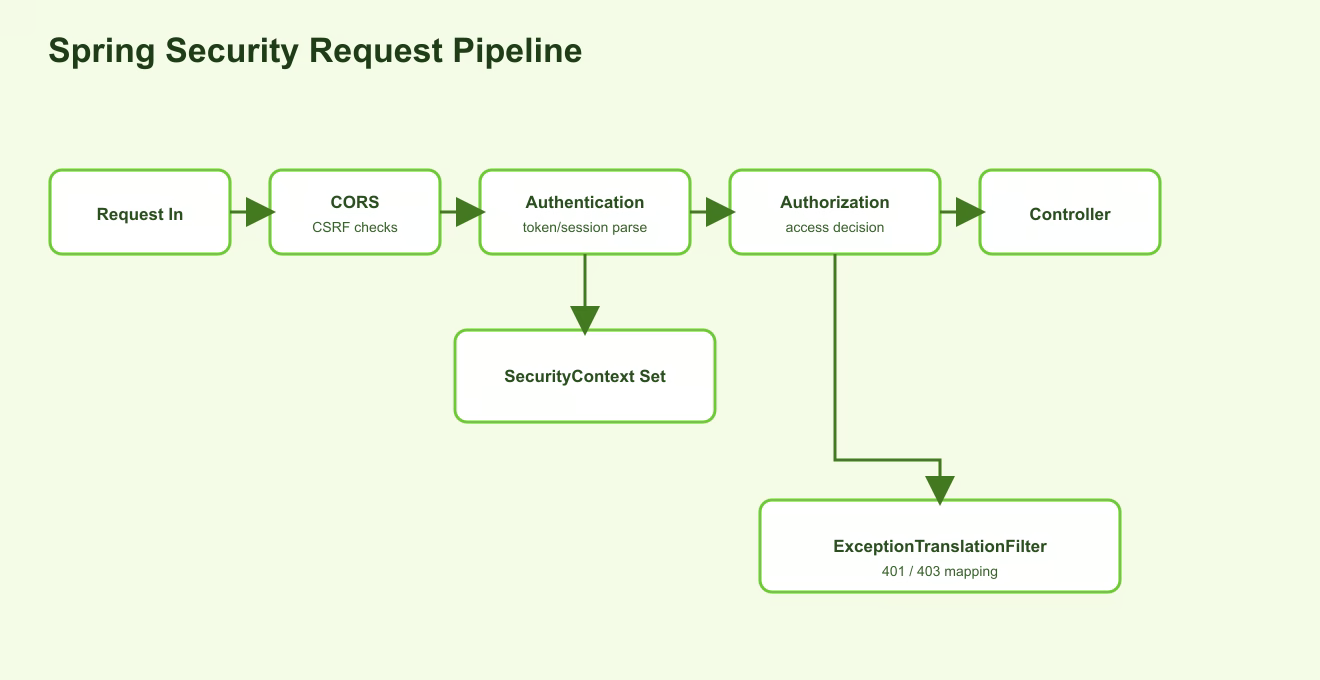
Example: the frontend sends GET /api/orders with the header Authorization: Bearer <token>. A JWT filter extracts the token, checks signature and expiration, reads user id and roles. If the token is valid, Spring creates an authentication object and stores it in SecurityContext. After that, authorization rules check whether this user may access /api/orders.
What SecurityContext is
SecurityContext is where Spring Security stores information about the current authenticated user while processing a request. During that request, controllers, services, and @PreAuthorize can know who the user is and what authorities the user has.
If authentication failed, SecurityContext does not contain a normal user. If authentication succeeded, it contains an authentication object: principal, authorities, and authenticated flag. In a stateless JWT API, this context is usually rebuilt on every request after token validation. In a session-based application, it may be restored from the session.
UserDetailsService and PasswordEncoder
If the application uses login and password, it needs to load the user and verify the password safely. UserDetailsService loads a user by username. Usually it queries the database, finds the user record, and returns an object with username, hashed password, and authorities.
PasswordEncoder verifies passwords. Passwords must not be stored as plain text. The database should store a hash, for example a BCrypt hash. When the user enters a password, Spring Security does not decrypt the old password. It compares the entered value against the hash through PasswordEncoder.matches.
@Service
class AppUserDetailsService implements UserDetailsService {
    private final UserRepository userRepository;

    @Override
    public UserDetails loadUserByUsername(String username) {
        User user = userRepository.findByEmail(username)
            .orElseThrow(() -> new UsernameNotFoundException(username));

        return org.springframework.security.core.userdetails.User
            .withUsername(user.getEmail())
            .password(user.getPasswordHash())
            .authorities(user.getRole())
            .build();
    }
}
@Bean
PasswordEncoder passwordEncoder() {
    return new BCryptPasswordEncoder();
}
This exact code is not required in every JWT-only API, but it explains the basic Spring Security model: load a user, verify credentials, and build authorities.
Session vs Stateless JWT
Session-based security stores login state on the server. After login, the server creates a session, the browser receives a cookie with session id, and future requests send that cookie. The server uses the session id to find the user. This is convenient for classic web applications, but it requires server-side session storage.
Stateless JWT works differently. After login, the client receives a token and sends it on every request. The server does not look up a session; it validates the token itself: signature, expiration, issuer, user id, roles, or claims. This is useful for APIs and horizontal scaling, but logout, refresh tokens, revoke, and key rotation become more complex.
JWT is not “just a string with user id”. If signature is not checked, expiration is ignored, or roles are mapped incorrectly, security breaks. Therefore a JWT filter must strictly validate the token and correctly convert claims into GrantedAuthority.
What SecurityConfig usually looks like
In Spring Boot, security setup is often declared through a SecurityFilterChain bean. This is where you describe which endpoints are public, which require authentication, where CORS/CSRF is enabled, which session mode is used, and which custom filters are added.
@Bean
SecurityFilterChain securityFilterChain(HttpSecurity http) throws Exception {
    return http
        .csrf(csrf -> csrf.disable())
        .sessionManagement(session -> session
            .sessionCreationPolicy(SessionCreationPolicy.STATELESS))
        .authorizeHttpRequests(auth -> auth
            .requestMatchers("/api/auth/**").permitAll()
            .requestMatchers("/api/admin/**").hasRole("ADMIN")
            .anyRequest().authenticated())
        .build();
}
This example means: auth endpoints are public, admin endpoints require role ADMIN, and all other requests require an authenticated user. For a stateless JWT API, a custom JWT filter is usually added before the standard username/password filter.
Do not copy configuration without understanding it. For example, csrf.disable() may be reasonable for a stateless token API, but dangerous for a cookie/session application. permitAll() is useful for a login endpoint, but dangerous for endpoints with private data.
@PreAuthorize and method-level security
URL rules protect routes, but sometimes that is not enough. One endpoint may work with different objects where access depends on resource ownership or business rules. For example, a user may read only their own orders, while an admin may read any order.
@PreAuthorize is placed on a service or controller method and checks a rule before the method runs. Method security must be enabled, usually with @EnableMethodSecurity.
@PreAuthorize("hasRole('ADMIN') or #userId == authentication.principal.id")
public List<OrderDto> getOrdersForUser(Long userId) {
    return orderRepository.findByUserId(userId);
}
This rule is close to the business operation. Even if someone accidentally opens the URL too broadly, the critical check remains near the method that actually returns data.
Practical example
A user opens the orders page, and the frontend sends GET /api/orders with a JWT. The request first passes CORS and other filters. The JWT filter reads the Authorization header, extracts the token, checks signature and expiration. If the token is invalid, Spring Security returns 401 and the controller is not called.
If the token is valid, the filter creates authentication and stores it in SecurityContext. Now Spring knows the principal and authorities. Then authorization rules check the endpoint: for example /api/orders requires an authenticated user. If the user is authenticated, the request reaches the controller. If the endpoint requires ROLE_ADMIN and the user only has ROLE_USER, the response is 403.
The service method may also have an additional check through @PreAuthorize: the user may read only their own orders. This protects not just the URL, but the business operation itself.
Stage takeaway
Spring Security does not randomly “break everything”. It performs checks before the controller. Authentication creates identity, SecurityContext stores it for the request, authorization decides access, and the filter chain may stop the request before MVC. If you debug a problem step by step: credentials -> authentication -> SecurityContext -> authorities -> authorization rule, the behavior becomes understandable.
Understanding checklist
- I can explain the difference between authentication and authorization.
- I understand why 401 and 403 mean different problems.
- I understand that the Security filter chain runs before the controller.
- I can explain what is stored in
SecurityContext. - I understand the role of
UserDetailsServiceandPasswordEncoder. - I can compare session-based security and stateless JWT.
- I understand why URL rules and
@PreAuthorizeare both useful.