
Stage 5. GROUP BY and HAVING for Business Metrics
When business asks “What is total revenue?” or “How many orders per customer?”, plain row-level SELECT is not enough. You need aggregation: convert many rows into compact summaries. GROUP BY and HAVING are made for this.
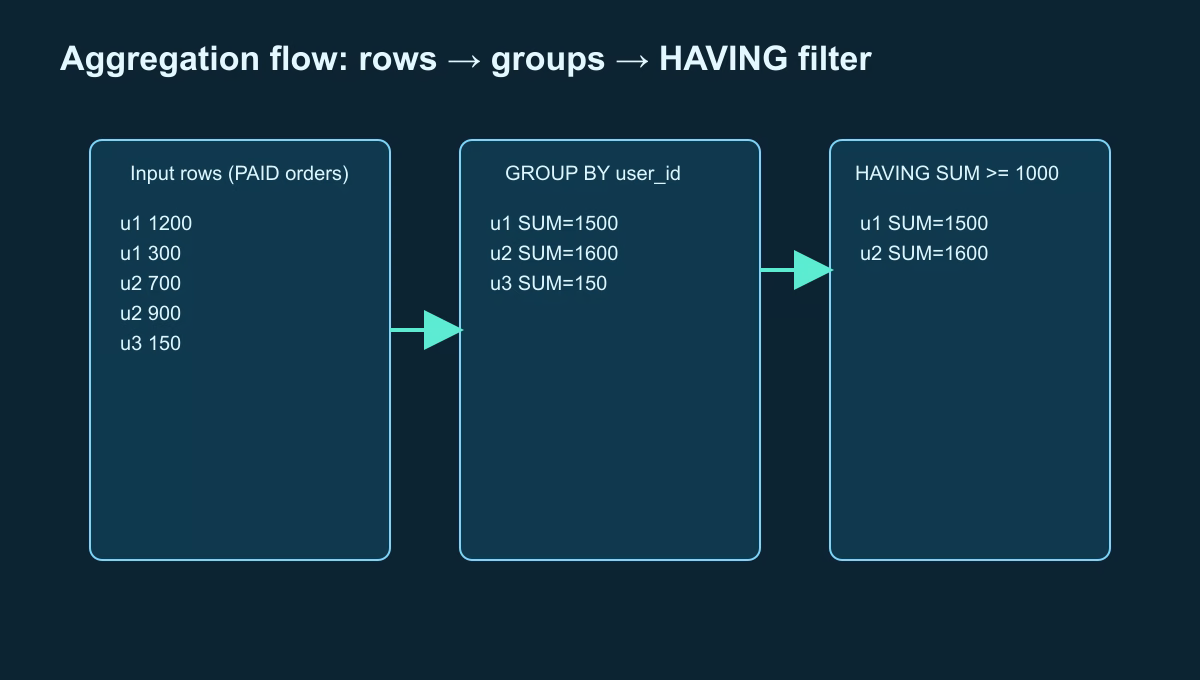
What GROUP BY does
GROUP BY splits rows into groups by one or more keys. Then aggregates like COUNT, SUM, AVG, MIN, MAX are calculated per group.
Example:
SELECT user_id,
       COUNT(*) AS orders_count,
       SUM(amount) AS total_amount
FROM orders
WHERE status = 'PAID'
GROUP BY user_id;
Execution logic:
- Keep only rows from
WHERE. - Group remaining rows by
user_id. - Compute count and sum for each group.
What HAVING does
HAVING filters already-built groups after GROUP BY.
SELECT user_id,
       SUM(amount) AS total_amount
FROM orders
WHERE status = 'PAID'
GROUP BY user_id
HAVING SUM(amount) >= 1000;
Meaning: keep only users with total paid amount at least 1000.
Key difference:
WHEREfilters rows before grouping;HAVINGfilters groups after grouping.
Terms and keywords in one table
| Keyword | Role | Example |
|---|---|---|
GROUP BY | Groups rows by key | GROUP BY user_id |
COUNT(*) | Counts rows per group | Number of orders |
SUM(amount) | Sums values per group | Revenue |
HAVING | Filters groups by condition | HAVING SUM(amount) > 1000 |
Example with output
SELECT user_id,
       COUNT(*) AS orders_count,
       SUM(amount) AS total_amount
FROM orders
WHERE status = 'PAID'
GROUP BY user_id
ORDER BY total_amount DESC;
| user_id | orders_count | total_amount |
|---|---|---|
| 1 | 5 | 4700.00 |
| 2 | 2 | 1400.00 |
| 3 | 1 | 300.00 |
Common beginner mistakes
- Using
HAVINGwhenWHEREshould be used. - Selecting a non-aggregated field not listed in
GROUP BY. - Grouping by too granular keys (for example full timestamp) and getting tiny fragmented groups.
Practical scenario: top customers by month
SELECT user_id,
       SUM(amount) AS revenue
FROM orders
WHERE status = 'PAID'
  AND created_at >= DATE '2026-05-01'
  AND created_at <  DATE '2026-06-01'
GROUP BY user_id
HAVING SUM(amount) >= 1000
ORDER BY revenue DESC;
This is a ready baseline for monthly top-customer reporting.
Practice Before the Next Lesson
Build the query step by step:
- Start with row-level
SELECTfor paid orders. - Add
GROUP BY. - Add
HAVING.
After each step, compare output transformation: rows → groups → filtered groups.